Stormy
Minimal, customizable and neofetch-like weather CLI inspired by rainy, written in Go
Stormy
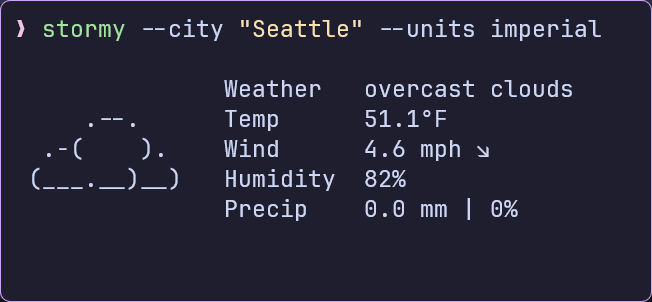
Minimal, customizable, and neofetch-like weather CLI inspired by rainy, written in Go.

Motivation⚓︎
Motivation
-
Stormy’s idea, structure, and design are based off rainy, but it’s written in Go instead of Python.
-
I built this because I really liked the concept of a Neofetch-style weather CLI.
-
The simplicity and visual appeal of rainy instantly clicked with me, and I wanted to recreate that experience in Go — Partly for my own satisfaction and partly because I enjoy building clean CLI tools.
Features⚓︎
Features
Multiple weather providers: OpenMeteo (default, no API key required) and OpenWeatherMap.
- Current weather conditions with ASCII art representation
- Temperature, wind, humidity, and precipitation information
- Customizable units (metric, imperial, standard)
- Local configuration file
- Color support for terminals
- Compact display mode
- Works out of the box with OpenMeteo
Installation⚓︎
Installation
Nix
One-time run
Permanent Installation
Add to your system configuration (using flakes)
# In your flake.nix
  inputs.stormy.url = "github:ashish0kumar/stormy";

# In your system or home-manager configuration environment.systemPackages =
  [ inputs.stormy.packages.x86_64-linux.stormy ];
Via go install
Build from Source⚓︎
Build from Source
Configuration⚓︎
Configuration
stormy follows the XDG Base Directory Specification for configuration files and will create a default configuration file on first run:
- Linux/macOS:
~/.config/stormy/stormy.toml - Windows:
%APPDATA%\stormy\stormy.toml - Custom: Set
XDG_CONFIG_HOMEenvironment variable to override the default location
Configuration Options⚓︎
Configuration Options
provider: Weather data provider ("OpenMeteo" or "OpenWeatherMap"). Defaults to "OpenMeteo".api_key: Your OpenWeatherMap API key.city: The city for which to fetch weather data.units: Units for temperature and wind speed (metric,imperialorstandard).showcityname: Whether to display the city name (trueorfalse).use_colors: Enables and disables text colors (trueorfalse).live_mode: Enables the "live" mode — long-running mode with frequent polling, never stops (trueorfalse).compact: Use a more compact display format (trueorfalse).
Example Config⚓︎
Example Config
Default Configuration (OpenMeteo — No API Key Required)
provider = "OpenMeteo"
api_key = ""
city = "New Delhi"
units = "metric"
showcityname = false
use_colors = false
live_mode = false
compact = false
OpenWeatherMap Configuration (Requires an API key from OpenWeatherMap)
Usage⚓︎
Usage
Display Examples⚓︎
| Stormy Display Panels | Stormy Display Panels |
|---|---|
Acknowledgements⚓︎
Acknowledgements
- OpenWeatherMap and Open-Meteo for providing weather data
- rainy for the overall idea, structure, and design of the project
- wttr.in for the ASCII weather icons
Tip
Stormy is a CLI weather tool that fetches weather and prints colourful ASCII forecasts in your terminal in a neofetch-inspired format. If you don't have prior experience with Python, we recommend reading Using Python's pip to Manage Your Projects' Dependencies, which is a really good introduction on the mechanics of Python package management and helps you troubleshoot if you run into errors.
Contributing⚓︎
Contributions are always welcome! If you have ideas, bug reports, or want to submit code, please feel free to open an issue or a pull request.
Contributors⚓︎
© 2025-present Ashish Kumar
